Synapse Dedicated SQL Pool to Microsoft Fabric: A Pre-Migration Assessment Checklist
This checklist covers what to confirm before a single object moves. It assumes a source-connected assessment, meaning you read the live estate directly rather than relying on interviews and tribal memory.
1. Inventory the estate before you estimate anything
Catalog every object the Dedicated SQL Pool actually contains: tables, views, stored procedures, functions, external tables, and the pipelines that feed them. Manual cataloging of a warehouse like this typically runs six to twelve weeks and still misses objects. Source-connected extraction reads metadata directly and produces a complete inventory in days. Confirm you have counts you can defend, because every downstream estimate depends on them.
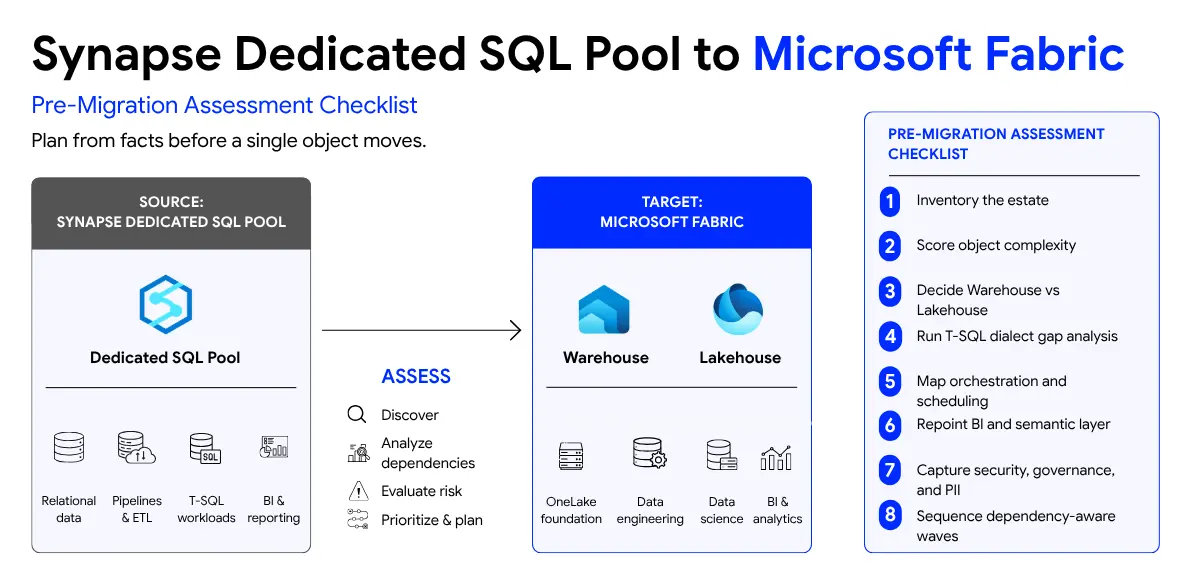
2. Score complexity per object, not just volume
A flat object count tells you volume, not effort. Score each object on a consistent rubric, for example one to five, based on dependency depth, dialect-specific constructs, and business logic density. A view that selects from three tables and a stored procedure with dynamic SQL, temp table rebuilds, and cursor logic are not the same unit of work. Complexity-weighted estimates are the difference between a defensible margin and the 40 to 60 percent error that sinks programs.
3. Decide Warehouse versus Lakehouse per workload
Fabric gives you both a Warehouse and a Lakehouse, and the choice is architectural, not cosmetic. Relational, T-SQL heavy workloads that serve BI often map cleanly to Fabric Warehouse. Workloads involving large-scale transformation, data science, or file-based data often belong in the Lakehouse with medallion bronze, silver, and gold layering. Most real estates are hybrid. Decide the target topology per workload before you design pipelines.
4. Run a T-SQL dialect gap analysis
Dedicated SQL Pool T-SQL is not identical to Fabric Warehouse T-SQL. Confirm which constructs in your stored procedures and views are supported, partially supported, or unsupported on the target, and flag them per object. This gap analysis is where a generic tool guesses and a rules-based engine resolves. Plan for the unsupported set explicitly rather than discovering it mid-migration.
5. Map orchestration and scheduling
Document how data currently arrives. Synapse pipelines, external orchestration, and any SQL Agent style scheduling need a Fabric Data Factory equivalent. Decide which pipelines translate directly and which should be rebuilt as notebooks. Under-scoping orchestration is a common reason migrations run long.
6. Plan the BI and semantic layer repoint
Power BI is usually the part most often left to the end. Confirm which semantic models, reports, and downstream dependencies point at the Dedicated SQL Pool, and plan the repoint so reports do not break at cutover. Treat semantic model migration as part of the plan, not an afterthought.
7. Capture security, governance, and PII up front
Confirm where PII lives before it moves. Map access controls, row level security, and any catalog entries in Atlan, Collibra, or Purview. Designing security after the build is how it becomes an afterthought. Capture it in the target architecture from the start.
8. Sequence the work into dependency-aware waves
Finally, sequence the work into waves that respect dependencies, with effort estimated by complexity tier and a risk register attached. A roadmap that ignores dependency order looks tidy and fails in execution.
Conclusion
The pattern across all of this is the same. Read the estate, score it, decide the target topology, and plan from facts. That is what a Modernization Canvas produces in 8 business days, and it is what lets execution begin in week three instead of next quarter. If you are scoping a Synapse to Fabric move, start with the assessment, not the build.